
FORMULA BUILDER
Build any formula without memorizing the syntax.
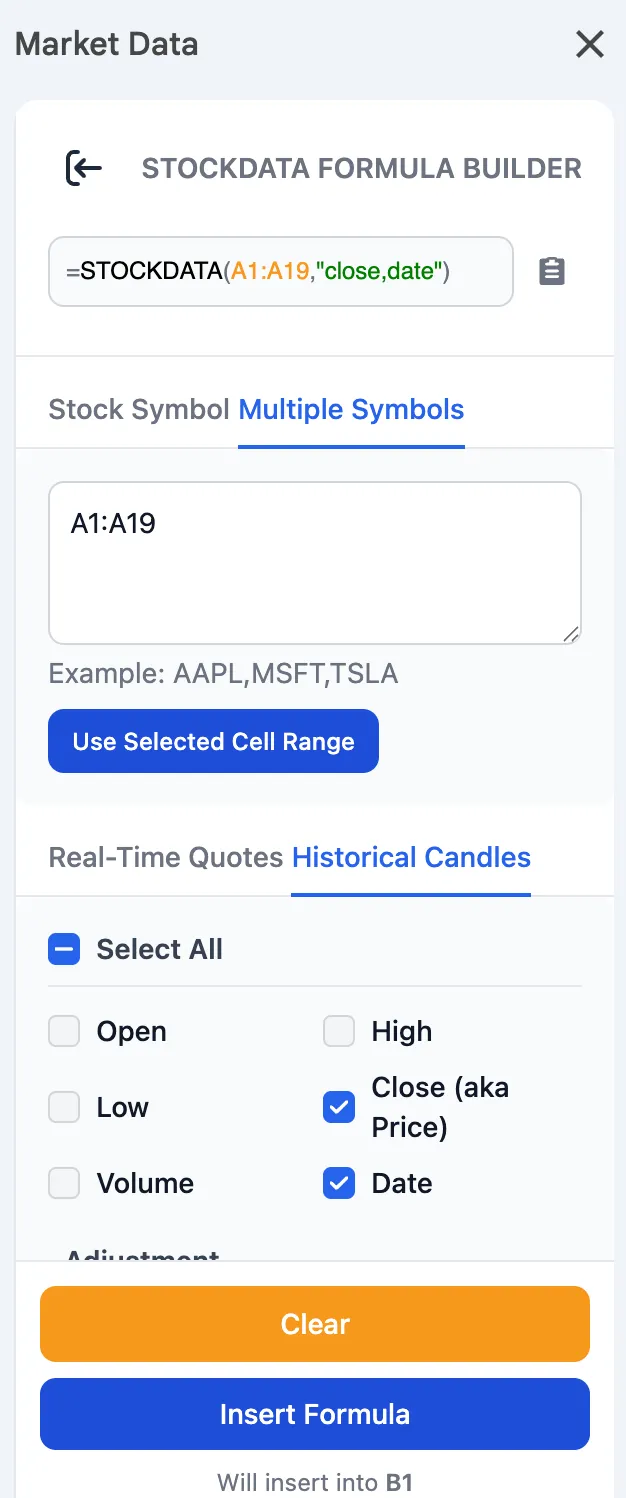 Love the data but tired of hunting through the docs every time you need to remember argument order, attribute names, or how to write a strike range? We just made that a thing of the past. The Market Data Sheets Add-on now has a Formula Builder: a point-and-click panel in the sidebar that writes your formula for you.
Pick a formula, fill in a simple form, and watch the exact formula build itself in a live preview as you click. When it looks right, hit Insert Formula and it drops straight into your selected cell.
Options traders, this one’s for you. Building an =OPTIONCHAIN() used to mean remembering the syntax for expirations, strike ranges, delta filters, and calls-vs-puts all in one line. Now it’s checkboxes and dropdowns: tick the columns you want, choose an expiration on a calendar or just type the days-to-expiration, and set your filters with a click. The builder handles the syntax underneath.
And because it’s guided, there’s nothing to learn. New to the add-on? You can build a working formula on day one without reading a single doc.
What it does for you
- Live formula preview: See the exact
=FORMULA(...)string form as you make choices, so you know precisely what you’re inserting before you insert it. - Grab cells with one click: Click a cell (or select a range) in your sheet and hit Use Selected Cell to drop the reference into the form. No typing
A1:A500by hand. - A form that adapts: Pick Real-Time Quotes and the date fields disappear; pick Historical Candles and they come back. You only ever see the fields that matter.
What else we worked on in July
- Earnings Data: Improved reliability on this endpoint.
- Options Data: Began a large project to backfill missing index option data.
- Stock Candles: Optimizations for faster responses from our database.